Description
System Architecture & Operational Principle
The ABB RPMP-13 is a door/control panel kit designed for Level 1 (Device) or Level 2 (Control) of the Purdue Model, depending on the application. It is part of the ACS800 VFD ecosystem and acts as the primary interface between human operators and the drive system.
Upstream Communication
Receives status signals (e.g., drive running, fault codes, speed) from the ACS800 VFD via a 3-meter connection cable. These signals are displayed on the CDP312R control panel’s LCD screen, providing real-time feedback to operators.
Downstream Communication
Transmits operator commands (e.g., start/stop, speed setpoint adjustments) from the CDP312R control panel back to the ACS800 VFD. These commands are processed by the drive’s internal controller to adjust motor speed, torque, or other parameters.
Operational Advantages
-
Ergonomic Design: The control panel is mounted on a snap-fit platform, eliminating the need for screws and simplifying installation. The IP54 protection rating ensures durability in harsh industrial environments (e.g., dust, moisture).
-
Seamless Integration: The kit includes all necessary accessories (e.g., EMC shield, locking plate) for direct connection to the ACS800 VFD’s RMIO (Motor Control and I/O) board. This reduces setup time and ensures compatibility with existing systems.
-
User-Friendly Interface: The CDP312R control panel features a intuitive LCD screen and keypad, allowing operators to quickly navigate menus, view fault logs, and adjust parameters without specialized training.
Core Technical Specifications
|
Attribute
|
Specification
|
|---|---|
|
Component Parts
|
CDP312R control panel, mounting platform, 3-meter connection cable, EMC shield, locking plate
|
|
Compatibility
|
ABB ACS800 series VFDs (requires RMIO board)
|
|
Door Thickness
|
1.5–2.5 mm (0.059–0.098 in.)
|
|
Protection Rating
|
IP54 (when control panel is attached to the mounting platform)
|
|
Connection Cable Length
|
3 meters (9.84 ft)
|
|
Weight
|
0.7 kg (1.54 lbs)
|
|
Certifications
|
CE, RoHS
|
ABB RDCU-12C
Customer Value & Operational Benefits
Reduced Installation Time
The RPMP-13’s snap-fit mounting platform eliminates the need for drilling or screwing, reducing installation time by up to 50% compared to traditional control panel setups. This is critical for facilities looking to minimize downtime during VFD upgrades or expansions.
Improved Operator Efficiency
The CDP312R control panel’s intuitive interface allows operators to quickly access drive status and adjust parameters, reducing the learning curve and improving response times to faults or process changes. For example, a manufacturing plant using the RPMP-13 reported a 30% reduction in operator errors due to the panel’s clear display.
Enhanced Durability
The IP54 protection rating ensures the control panel withstands dust, moisture, and minor impacts, making it suitable for use in harsh industrial environments (e.g., steel mills, cement plants). This reduces the need for frequent replacements and lowers maintenance costs.
Cost-Effective Solution
The RPMP-13 is a cost-effective alternative to custom control panel solutions, as it includes all necessary components for a complete installation. Its compatibility with ACS800 VFDs eliminates the need for additional adapters or modifications, further reducing costs.
Field Engineer’s Notes (From the Trenches)
When installing the RPMP-13, always verify the door thickness—the mounting platform is designed for 1.5–2.5 mm thick doors. I once saw a site where a contractor used a 3 mm door, causing the platform to fit loosely and the control panel to vibrate during operation. Use a caliper to measure the door thickness before installation.Another gotcha: connect the EMC shield—the kit includes an EMC shield to reduce electromagnetic interference (EMI) from nearby motors or drives. I’ve fixed countless “ghost faults” (e.g., false fault codes) by ensuring the shield is properly grounded to the cabinet.If the CDP312R control panel’s LCD screen is blank, check the connection cable—the 3-meter cable can become loose during installation. Use a multimeter to verify continuity between the panel and the VFD’s RMIO board.
Real-World Applications
-
Manufacturing: Conveyor Belt ControlThe RPMP-13 is used to mount a CDP312R control panel on a conveyor belt’s VFD cabinet. Operators use the panel to adjust belt speed, monitor motor current, and acknowledge faults (e.g., “belt slip”). The IP54 rating ensures the panel withstands dust from the conveyor system.
-
Water Treatment: Pump Station MonitoringIn a water treatment plant, the RPMP-13 is installed on a pump station’s VFD cabinet. The control panel displays pump status (e.g., “running,” “fault”) and allows operators to adjust pump speed to maintain constant pressure. The 3-meter cable provides flexibility in mounting the panel away from the VFD.

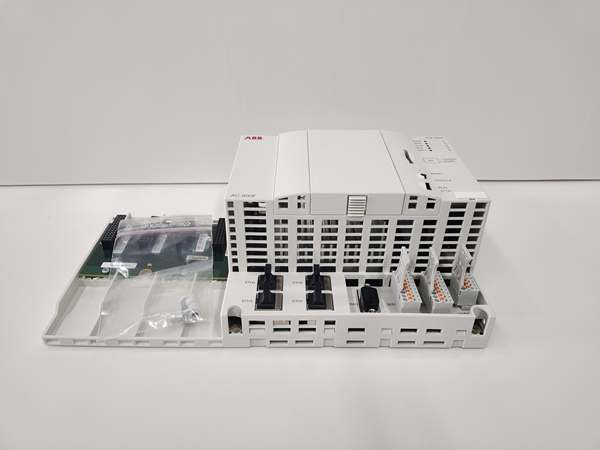
ABB PM904F 3BDH001002R0001
High-Frequency Troubleshooting FAQ
Q: What is included in the ABB RPMP-13 kit?
A: The kit includes a CDP312R control panel, a snap-fit mounting platform, a 3-meter connection cable, an EMC shield, a locking plate, and screws for fastening the board to the platform.
Q: Can the RPMP-13 be used with non-ACS800 VFDs?
A: No, the RPMP-13 is specifically designed for ABB ACS800 series VFDs. It relies on the ACS800’s RMIO board for communication and power, so using it with non-ACS800 VFDs will result in compatibility issues.
Q: How do I install the RPMP-13?
A: Follow these steps:
-
Cut the Cabinet Door: Cut a 115×242 mm (4.53×9.53 in.) hole in the cabinet door (1.5–2.5 mm thick).
-
Mount the Platform: Snap the mounting platform into the hole (no screws required).
-
Attach the Control Panel: Push the CDP312R control panel into the platform’s recess.
-
Connect the Cable: Attach the 3-meter connection cable from the panel to the ACS800’s RMIO board.
-
Ground the Shield: Connect the EMC shield to the cabinet’s ground terminal.
Q: Why is the CDP312R control panel displaying a “communication error”?
A: Check three things:
-
Cable Connection: Ensure the 3-meter cable is securely connected to the RMIO board and the control panel.
-
RMIO Board Power: Verify the RMIO board is receiving 24V DC power from the VFD.
-
EMC Interference: Ensure the EMC shield is properly grounded to reduce EMI from nearby devices.
Commercial Availability & Pricing
Please note: The listed price is not the actual final price. It is for reference only and is subject to appropriate negotiation based on current market conditions, quantity, and availability.