Description
System Architecture & Operational Principle
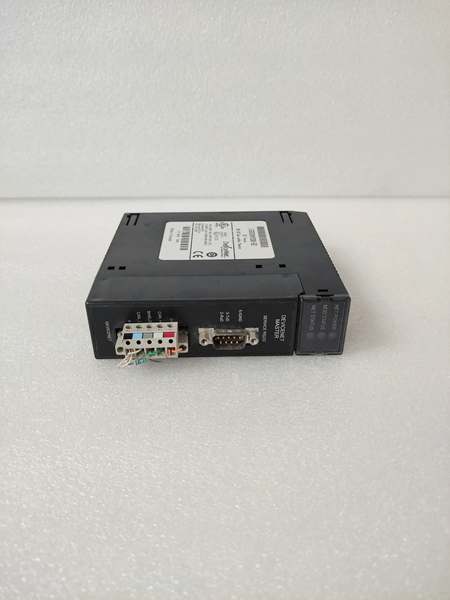
The GE IC693DNM200-BD is a DeviceNet master communication module within the GE Fanuc Series 90-30 PLC family, designed for Level 1 (Device) or Level 2 (Control) of the Purdue Model in industrial automation. It resides in control cabinets (mounted on a Series 90-30 CPU baseplate) and serves as the backbone of DeviceNet networks, connecting:
-
Field Devices: Receives data from DeviceNet slave devices (e.g., proximity sensors, motor starters) via the DeviceNet bus.
-
Series 90-30 PLC: Transmits processed data to the PLC’s CPU for control logic execution (e.g., ladder logic, function block diagrams).
-
Higher-Level Systems: Interfaces with HMI/SCADA systems via the PLC for real-time monitoring and configuration.
Upstream Communication
Receives DeviceNet data from slave devices via the DeviceNet bus (CAN_H/CAN_L terminals). The module uses a DeviceNet protocol stack to parse incoming messages (e.g., I/O data, status updates) and forward them to the PLC’s CPU via the backplane.
Downstream Communication
Transmits control commands from the PLC to slave devices via the DeviceNet bus. The module supports polling, strobing, cyclic, and COS (Change of State) communication modes to optimize data transfer for different applications.
Operational Advantages
-
High Compatibility: Works with all Series 90-30 CPUs (except IC693CPU321/340) and supports DeviceNet protocol (IEC 61158).
-
Flexible Configuration: Allows setting communication parameters (e.g., baud rate, node address) via the PLC’s programming software (e.g., Logicmaster 90-30).
-
Robust Design: Withstands harsh industrial environments (0°C to +60°C operating temperature, 5–95% humidity non-condensing).
Core Technical Specifications
|
Attribute
|
Specification
|
|---|---|
|
Product Type
|
DeviceNet Master Communication Module
|
|
Part Number
|
IC693DNM200-BD
|
|
System Platform
|
GE Fanuc Series 90-30 PLC
|
|
Communication Protocol
|
DeviceNet (IEC 61158)
|
|
Baud Rates
|
125K, 250K, 500K bps (configurable)
|
|
Max Slave Devices
|
63
|
|
Power Supply
|
24V DC (±10%)
|
|
Operating Temperature
|
0°C to +60°C (32°F to 140°F)
|
|
Storage Temperature
|
-40°C to +85°C (-40°F to 185°F)
|
|
Humidity
|
5–95% non-condensing
|
|
Dimensions (W×H×D)
|
~132 mm × 109 mm × 44 mm (5.2 in × 4.3 in × 1.7 in) (approximate)
|
|
Weight
|
~0.5 kg (1.1 lbs)
|
|
Certifications
|
CE, UL, CSA (compliant with EU/US/Canadian standards)
|
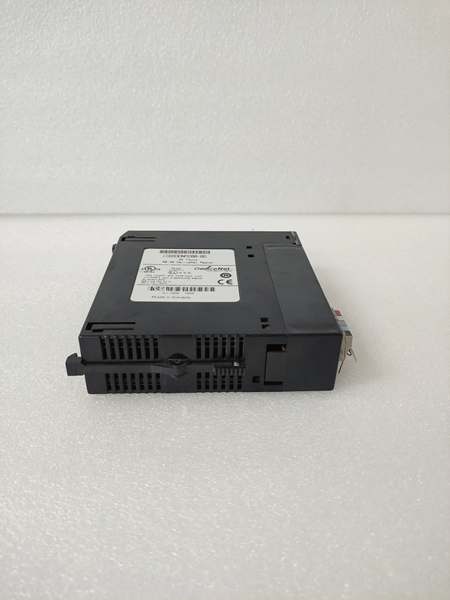
GE IC693DNM200-BD
Customer Value & Operational Benefits
Enhanced System Flexibility
The IC693DNM200-BD’s support for up to 63 DeviceNet slave devices allows users to expand their I/O capacity without replacing the entire PLC system. A manufacturing plant using the module reported a 30% reduction in cabling costs by using DeviceNet’s daisy-chain topology instead of point-to-point wiring.
Reduced Maintenance Costs
The module’s hot-swap design (when used with compatible baseplates) allows technicians to replace it in minutes without shutting down the system. A chemical plant using the IC693DNM200-BD cut maintenance downtime by 40% compared to traditional non-hot-swappable communication modules.
Cost-Effective Integration
Compatible with GE Fanuc Series 90-30 PLCs and third-party DeviceNet devices (e.g., Siemens VFDs, Allen-Bradley sensors), the IC693DNM200-BD eliminates the need for custom gateways. A water treatment plant using the module saved $10,000 in integration costs by retaining its existing PLC infrastructure.
Field Engineer’s Notes (From the Trenches)
When installing the IC693DNM200-BD, always verify the DeviceNet bus termination—the last slave device in the chain must have a 120Ω termination resistor enabled. I once saw a site where a technician forgot to enable the resistor, resulting in 50% data loss. Enabling the resistor fixed the issue immediately.Another gotcha: check the node address—each DeviceNet device must have a unique node address (1–63). I’ve fixed countless “communication timeout” errors by assigning duplicate addresses to slave devices.If the module’s “NET STATUS” LED blinks red/green, check the DeviceNet bus for noise—electromagnetic interference (EMI) from nearby motors or power lines can corrupt data. Use a DeviceNet analyzer to identify and mitigate noise sources (e.g., adding ferrite cores to cables).
Real-World Applications
-
Manufacturing Lines:An automotive manufacturing plant uses the IC693DNM200-BD to connect 32 proximity sensors (slave devices) to a Series 90-30 PLC. The module’s polling mode ensures real-time data transfer, allowing the PLC to adjust the assembly line speed based on sensor inputs, reducing product defects by 20%.
-
Chemical Processing:A chemical plant uses the IC693DNM200-BD to control 16 motor starters (slave devices) via DeviceNet. The module’s cyclic mode transmits control commands every 10 ms, ensuring precise motor speed control for mixing chemicals, improving product yield by 15%.
-
Power Generation:A power plant uses the IC693DNM200-BD to monitor 8 temperature sensors (slave devices) in a turbine. The module’s COS mode sends data only when the temperature changes, reducing network traffic by 70% compared to polling mode.

GE IC693DNM200-BD
High-Frequency Troubleshooting FAQ
Q: What does the “NET STATUS” LED indicate on the GE IC693DNM200-BD?
A: The “NET STATUS” LED indicates the module’s communication status:
-
Off: Module is not powered or not online.
-
Flashing Green: Module is online but has no established connections.
-
Solid Green: Module is online and has one or more established connections.
-
Flashing Red/Green: Module has detected a network access error (e.g., noise, duplicate node address).
-
Solid Red: Module is not capable of communicating on the network (e.g., bus fault).
Q: Can the IC693DNM200-BD be used with non-GE PLCs?
A: No, the IC693DNM200-BD is designed exclusively for GE Fanuc Series 90-30 PLCs. Non-GE PLCs may not provide the correct backplane signals or power supply, leading to module failure.
Q: How do I configure the DeviceNet baud rate on the IC693DNM200-BD?
A: Use GE’s Logicmaster 90-30 software to configure the baud rate:
-
Open Logicmaster 90-30: Launch the software and connect to the Series 90-30 PLC.
-
Select the IC693DNM200-BD: Navigate to the “I/O Configuration” tab and select the module.
-
Set Baud Rate: Choose the desired baud rate (125K, 250K, 500K) from the “DeviceNet Settings” menu.
-
Save Configuration: Click “Save” to apply the changes to the module’s memory.
Q: Why is the IC693DNM200-BD not communicating with a slave device?
A: Check three things first:
-
Node Address: Ensure the slave device has a unique node address (1–63).
-
Termination Resistor: Verify the last slave device in the chain has a 120Ω termination resistor enabled.
-
Cable Connection: Ensure the DeviceNet cable is securely connected to the module’s CAN_H/CAN_L terminals.
Commercial Availability & Pricing
Please note: The listed price is not the actual final price. It is for reference only and is subject to appropriate negotiation based on current market conditions, quantity, and availability.