Description
System Architecture & Operational Principle
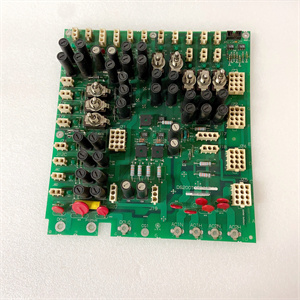
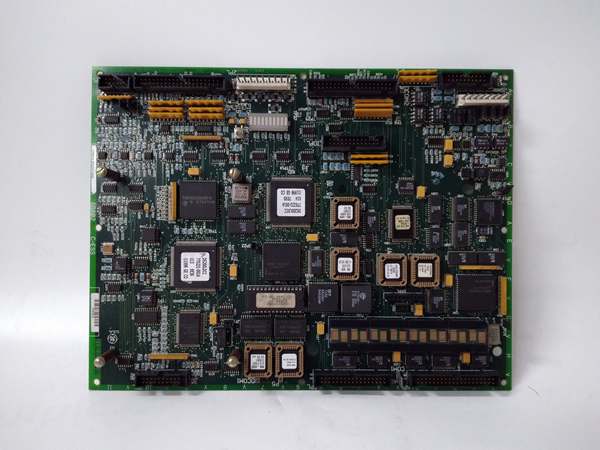
The GE DS200LDCCH1ANA is a core component of the GE Mark V Series turbine control systems, designed for Level 2 (Control) of the Purdue Model in industrial automation. It resides in the <R> core of the Mark V control cabinet (mounted via plug-in slots) and serves as the bridge between:
-
Main Processor (UCVE/UCVB): Receives control commands and transmits process data.
-
I/O Boards: Collects sensor data (e.g., temperature, pressure) and sends control signals to actuators (e.g., valves, motors).
-
Plant Networks: Interfaces with SCADA/HMI systems via Ethernet (Modbus TCP/IP) for real-time monitoring and data logging.
Upstream Communication
Receives raw data from field devices (e.g., motor encoders, pressure sensors) via I/O boards. The board uses signal conditioning circuits (filters, amplifiers) to clean and normalize these signals before transmitting them to the main processor.
Downstream Communication
Transmits conditioned data to:
-
Main Processor: Via the Genius Bus (high-speed serial protocol) for real-time control decisions.
-
I/O Boards: Via the ARCNET (coaxial cable) for command execution.
-
Plant Networks: Via Ethernet (10/100Base-T) for plant-wide monitoring and data logging.
Operational Advantages
-
Centralized Communication: Consolidates four networks (ARCNET, Genius I/O, Ethernet, IONet) into one board, reducing cabinet space and wiring complexity.
-
High Reliability: Dual Intel i960 processors with VxWorks OS ensure fault tolerance and fast response times (<10 ms).
-
Scalability: Supports migration to Mark VIe systems via the IONet link, making it a future-proof solution for turbine control upgrades.

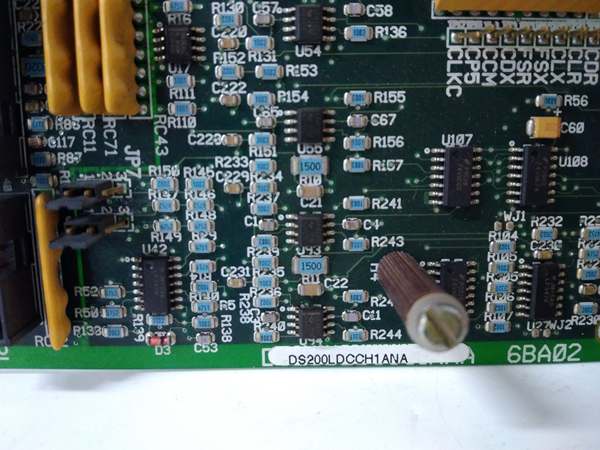
GE DS200LDCCH1ANA
Core Technical Specifications
|
Attribute
|
Specification
|
|---|---|
|
Product Type
|
Drive Control & LAN Communication Board
|
|
Part Number
|
DS200LDCCH1ANA
|
|
System Platform
|
GE Mark V Series Turbine Control Systems
|
|
Processors
|
Dual Intel i960 microprocessors (VxWorks OS)
|
|
Memory
|
8 MB DRAM / 4 MB flash
|
|
Communication Protocols
|
ARCNET (Stage Link), Genius I/O LAN, Ethernet (10/100Base-T), IONet (fiber/copper)
|
|
Input Voltage
|
24V DC (nominal)
|
|
Operating Temperature
|
-40°C to +85°C (-40°F to 185°F)
|
|
Storage Temperature
|
-55°C to +125°C (-67°F to 257°F)
|
|
Humidity
|
5–95% non-condensing
|
|
Dimensions (W×H×D)
|
~220 mm × 165 mm × 25 mm (8.7 in × 6.5 in × 1 in) (approximate)
|
|
Weight
|
~0.5 kg (1 lb)
|
|
Certifications
|
CE, UL, ATEX (Ex d IIB T5 Gb) (hazardous location compliant)
|
Customer Value & Operational Benefits
Enhanced Turbine Reliability
The DS200LDCCH1ANA’s centralized communication and fault-tolerant design reduce the risk of system failures. A power plant using the board reported a 99.9% uptime rate for its Mark V control system, compared to 95% with traditional multi-board setups.
Reduced Maintenance Costs
The board’s modular design allows technicians to replace it in minutes without shutting down the turbine. A chemical plant using the DS200LDCCH1ANA cut maintenance downtime by 40% compared to traditional non-modular communication boards.
Cost-Effective Integration
Compatible with GE Mark V Series and existing plant networks, the DS200LDCCH1ANA eliminates the need for custom communication gateways. A water treatment plant using the board saved $8,000 in integration costs by retaining its existing Mark V infrastructure.
Improved Process Visibility
The board’s Ethernet communication enables real-time data transfer to plant-wide SCADA systems, allowing operators to monitor turbine performance and adjust parameters proactively. A gas turbine plant using the DS200LDCCH1ANA improved energy efficiency by 8% by optimizing fuel flow based on real-time data.
Field Engineer’s Notes (From the Trenches)
When installing the DS200LDCCH1ANA, always verify the 24V DC power supply—the board requires a stable 24V DC input (±10%). I once saw a site where a technician connected a 12V DC supply, resulting in a “power fault” error. Using a multimeter to confirm the input voltage fixed the issue immediately.Another gotcha: check the Genius Bus termination—improper termination (120Ω resistor) can cause communication errors. I’ve fixed countless “Genius Bus timeout” errors by adding a termination resistor to the last board in the chain.If the board’s “FAULT” LED illuminates, check the processor status—the most common cause is a faulty LAN Control Processor (LCP). Use the Mark V controller’s software (e.g., ToolboxST) to diagnose the faulty processor and replace the board if necessary.GE DS200LDCCH1ANA
Real-World Applications
-
Power Generation:A coal-fired power plant uses the DS200LDCCH1ANA to control the feedwater pump motor in its steam turbine system. The board’s analog inputs receive pressure sensor data, and its digital outputs adjust the pump speed via a VFD, maintaining optimal boiler feedwater pressure.
-
Gas Turbines:A natural gas power plant uses the DS200LDCCH1ANA to interface with the gas turbine’s encoder and actuator systems. The board’s LAN communication transmits real-time speed data to the Mark V controller, which adjusts the fuel flow to maintain stable turbine operation.
-
Combined-Cycle Plants:A combined-cycle power plant uses the DS200LDCCH1ANA to synchronize the gas turbine and steam turbine. The board’s ethernet communication enables data exchange between the two turbines, optimizing the combined-cycle efficiency.
High-Frequency Troubleshooting FAQ
Q: What does the “FAULT” LED indicate on the GE DS200LDCCH1ANA?
A: The red “FAULT” LED indicates a critical error, such as:
-
Power Supply Failure: The input voltage is outside the 24V DC range (check with a multimeter).
-
Genius Bus Communication Failure: The board is not receiving data from the Mark V controller (check the Genius Bus cable and termination).
-
Processor Fault: One of the four microprocessors has failed (diagnose via ToolboxST).
Q: Can the DS200LDCCH1ANA be used with non-GE controllers?
A: No, the DS200LDCCH1ANA is designed exclusively for GE Mark V Series controllers. Non-GE controllers may not provide the correct Genius Bus signals or power supply, leading to board failure.
Q: How do I test the DS200LDCCH1ANA?
A: Use a multimeter to test the following:
-
Input Voltage: Check the voltage at the 24V DC terminals (should be 24V DC ±10%).
-
Digital Outputs: Verify that the digital outputs switch on/off when commanded (use a test lamp).
-
Communication Signals: Use a network analyzer to check the Genius Bus signals (should be within the -10 dBm to +10 dBm range).
Q: Why is the DS200LDCCH1ANA’s communication slow?
A: Check three things first:
-
Genius Bus Load: Ensure the bus is not overloaded (max 32 nodes).
-
Cable Quality: Use shielded twisted-pair (STP) cables for Genius Bus communication.
-
Network Congestion: Reduce traffic on the ethernet network to prioritize Genius Bus data.
Commercial Availability & Pricing
Please note: The listed price is not the actual final price. It is for reference only and is subject to appropriate negotiation based on current market conditions, quantity, and availability.