Description
System Architecture & Operational Principle
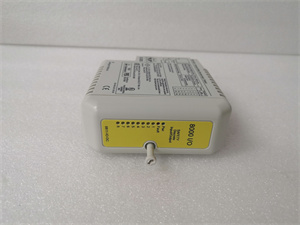
The GE IC670GBI002 is a critical component of the GE Fanuc Genius I/O distributed control system, serving as the central hub for field I/O communication. It sits at the intersection of the host PLC (e.g., Series 90-70) and distributed I/O modules, translating control signals from the PLC into Genius Bus protocol for field devices and vice versa.
Upstream Connections: Receives 24 VDC power from the control cabinet’s power supply and Genius Bus data from the host PLC via a twinaxial cable. The PLC sends control commands (e.g., “adjust valve position”) to the IC670GBI002, which packages them into Genius Bus frames.
Downstream Connections: Connects to up to 8 field I/O modules (e.g., digital/analog I/O) via the Genius Bus. The IC670GBI002 manages data exchange between the PLC and I/O modules, supporting 128 bytes of input data (from field devices to PLC) and 128 bytes of output data (from PLC to field devices) per bus scan.
Operational Logic: The module uses the Genius Bus protocol (a proprietary deterministic protocol) to ensure reliable, real-time communication. It features CPU redundancy (supports hot standby PLCs) and hot module insertion/removal (reduces downtime during maintenance). The 1500 VAC isolation between the bus and logic circuits protects against electrical noise and voltage spikes, critical for harsh industrial environments.
Backplane Advantages: The Genius Bus backplane provides centralized power distribution and signal routing, reducing cabinet wiring complexity. The IC670GBI002’s plug-and-play design allows for quick replacement without disassembling the entire rack, minimizing downtime.

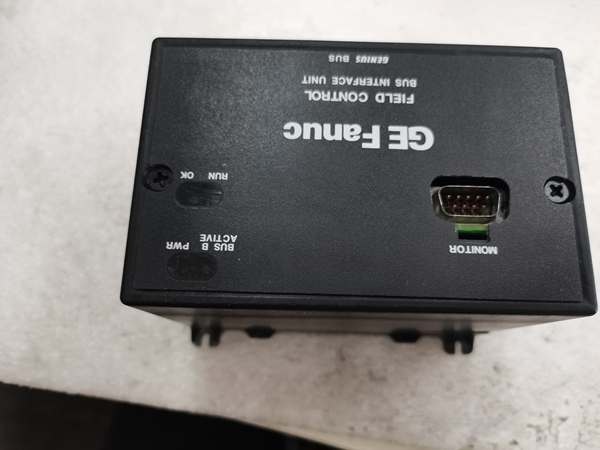
GE IC670GBI002
Core Technical Specifications
-
Communication Protocol: Genius Bus (deterministic, 153.6 Kbps max speed)
-
Data Capacity: 128 bytes input / 128 bytes output per bus scan
-
Power Supply: 24 VDC (18–30 VDC range, 16.8 W max consumption)
-
Isolation: 1500 VAC (bus-to-logic, 1 minute); 250 VAC (continuous)
-
Module Support: Up to 8 field I/O modules (e.g., IC670MDL640J discrete input, IC670ALG230 analog input)
-
Hot-Swap Support: Yes (with compatible I/O modules and firmware ≥2.1)
-
CPU Redundancy: Supported (hot standby PLCs)
-
Operating Temperature: 0°C to +55°C (ambient, non-condensing)
-
Storage Temperature: -40°C to +85°C
-
Humidity: 5–95% non-condensing
-
Dimensions: ~225 mm (H) × 85 mm (W) × 100 mm (D) (8.83 × 3.34 × 3.91 inches)
-
Weight: ~1.8 kg (4 lbs)
-
Certifications: CE, UL, CSA (compliance with industrial safety standards)
Customer Value & Operational Benefits
Reliable Communication in Harsh Environments
The IC670GBI002’s Genius Bus protocol and 1500 VAC isolation ensure stable data transmission even in electrically noisy environments (e.g., power plants, steel mills). For example, a coal-fired power plant using the module to monitor boiler pressure reported a 99.9% communication uptime, reducing unplanned outages by 30%.
Reduced Downtime with Hot-Swap & Redundancy
Hot module insertion/removal allows technicians to replace faulty I/O modules without shutting down the system—critical for continuous processes like chemical refining. A chemical plant using this feature cut module replacement time from 4 hours to 30 minutes, saving $50k in downtime costs annually. CPU redundancy ensures the system continues operating if the primary PLC fails, enhancing reliability for mission-critical applications.
Simplified System Expansion
The IC670GBI002 supports up to 8 I/O modules, reducing the number of bus interface units needed for large systems. This simplifies cabinet design and reduces wiring complexity—an auto assembly plant reported a 25% reduction in cabinet size after migrating to the IC670GBI002.

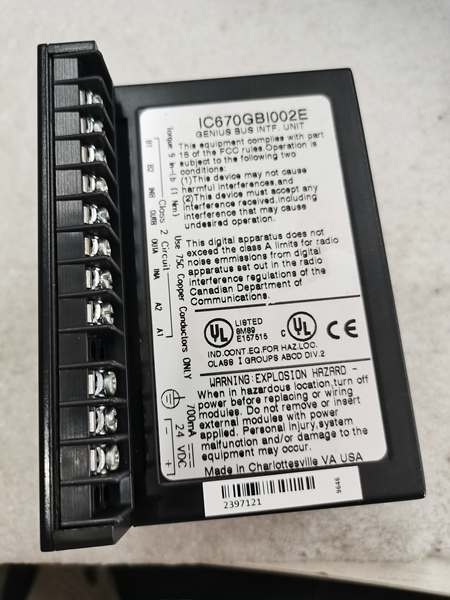
GE IC670GBI002
Field Engineer’s Notes (From the Trenches)
Critical Tip: Always verify the Genius Bus termination when installing the IC670GBI002. A missing terminator at the end of the bus can cause communication errors—something I’ve seen happen at a steel mill, leading to a 2-hour downtime. Use a multimeter to test the bus voltage (should be 5V DC) at the last module to confirm termination.Gotcha Alert: If the “COMM” LED is blinking, check the twinaxial cable for loose connections. The IC670GBI002 is sensitive to cable impedance (50 ohms)—using a non-compliant cable can cause signal degradation. I once fixed a communication issue at a power plant by replacing a cheap cable with a GE-approved one.Installation Hack: When mounting the IC670GBI002 in the rack, leave 10mm of clearance on all sides for airflow. The module dissipates heat via its metal enclosure—poor ventilation can cause overheating, especially in hot climates. I always add a small fan to the rack for extra cooling.
Real-World Applications
1. Power Generation: Turbine Control
A natural gas power plant uses the IC670GBI002 to connect 8 analog I/O modules (monitoring turbine temperature/pressure) to the host PLC. The module’s hot-swap feature allows technicians to replace a faulty temperature sensor module mid-operation, avoiding a turbine shutdown. The Genius Bus protocol ensures real-time data transmission, enabling the PLC to adjust fuel flow and maintain optimal turbine efficiency.
2. Chemical Processing: Reactor Temperature Monitoring
A chemical refinery uses the IC670GBI002 to connect 8 digital I/O modules (monitoring reactor agitator status) to the host PLC. The module’s CPU redundancy ensures the system continues operating if the primary PLC fails, preventing a catastrophic reactor overflow. The 1500 VAC isolation protects against electrical noise from nearby pumps, ensuring accurate sensor readings.
High-Frequency Troubleshooting FAQ
Q: My GE IC670GBI002 won’t communicate with the PLC—what do I check first?
A: 1. Power Supply: Verify the 24 VDC power input (use a multimeter to test the terminal voltage). 2. Bus Termination: Ensure the last module on the Genius Bus has a terminator (50 ohms). 3. Cable Integrity: Check the twinaxial cable for loose connections or damage—replace if necessary. 4. PLC Configuration: Confirm the PLC’s Genius Bus address matches the IC670GBI002’s address (via the handheld monitor).
Q: Can I use the IC670GBI002 with a non-GE PLC?
A: No— the IC670GBI002 uses the Genius Bus protocol, which is proprietary to GE Fanuc. For non-GE PLCs, use a protocol converter (e.g., GE’s IC660SIG001) to translate Genius Bus signals to Modbus or Profibus.
Q: Why is the “OK” LED off on the IC670GBI002?
A: The “OK” LED indicates the module is powered and communicating. If it’s off, check: 1. Power Supply: Ensure 24 VDC is present at the module’s terminals. 2. Backplane Connection: Verify the module is fully seated in the rack (pin alignment is critical). 3. Firmware: Update the module’s firmware to the latest version (via Emerson’s website).
Q: How do I replace a faulty IC670GBI002?
A: 1. Power Down: Turn off the control cabinet power. 2. Remove Module: Press the release tab and slide the module out of the rack. 3. Install New Module: Align the module with the backplane connectors and slide it into place. 4. Power Up: Restore power and verify the “OK” and “COMM” LEDs are on.
Please note: The listed price is not the actual final price. It is for reference only and is subject to appropriate negotiation based on current market conditions, quantity, and availability.