Description
System Architecture & Operational Principle
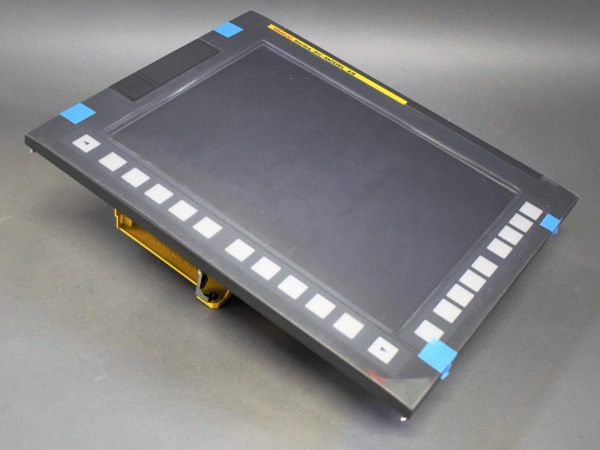
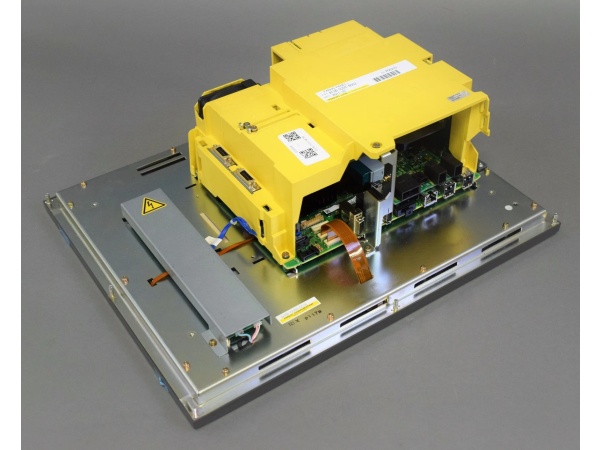
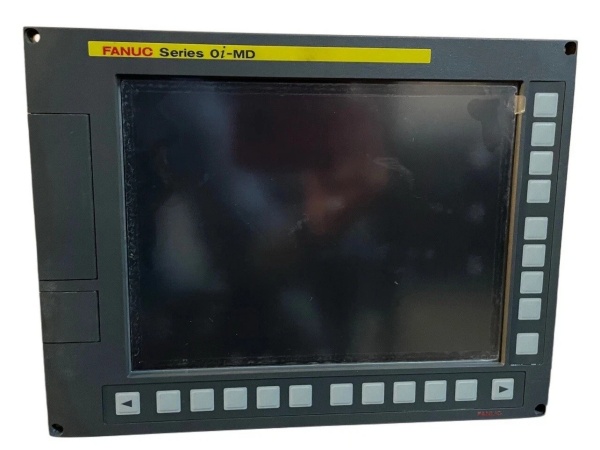
The Fanuc A13B-0202-B002 is a 15″ LCD operator interface panel within the Fanuc 0i-MD/31i Model B CNC ecosystem, designed for Level 2 (Supervisory Control) of the Purdue Model in industrial automation. It resides in the operator station (typically mounted on the machine tool’s control cabinet) and serves as the bridge between human operators and CNC controllers (e.g., Fanuc 0i-MD, 31i Model B).
Upstream Communication
Receives graphical user interface (GUI) commands from operators via the 15″ LCD touchscreen (or soft keys). These commands (e.g., “start program,” “adjust feed rate”) are transmitted to the CNC controller via a serial communication link (e.g., RS-232C, Ethernet) or FSSB (FANUC Serial Servo Bus) for servo control.
Downstream Communication
Displays process data from the CNC controller (e.g., spindle speed, feed rate, alarm messages) on the 15″ LCD screen. The panel also outputs status signals (e.g., “ready,” “fault”) to the CNC controller via the same communication links, enabling real-time monitoring of machine status.
Operational Advantages
-
High-Resolution Display: The 15″ color TFT LCD (1024×768 dots) provides clear, detailed visualization of process data, reducing operator errors.
-
Intuitive Interface: The touchscreen (or soft keys) allows operators to quickly input commands, improving efficiency in machine setup and operation.
-
Seamless Integration: As part of the Fanuc 0i-MD/31i Model B ecosystem, the A13B-0202-B002 integrates seamlessly with Fanuc CNC controllers, eliminating the need for custom wiring or protocol converters.

Fanuc A13B-0202-B002
Core Technical Specifications
|
Attribute
|
Specification
|
|---|---|
|
Display Type
|
15″ color TFT LCD (1024×768 dots, 16M colors)
|
|
Touchscreen
|
Resistive (optional, depending on configuration)
|
|
Power Supply
|
24 V DC (±10%, 10A max current)
|
|
Communication Interfaces
|
RS-232C (serial), Ethernet (10/100 Mbps), FSSB (FANUC Serial Servo Bus)
|
|
Operating Temperature
|
+5°C to +45°C (41°F to 113°F)
|
|
Storage Temperature
|
-20°C to +60°C (-4°F to 140°F)
|
|
Humidity Tolerance
|
5%–95% non-condensing
|
|
Dimensions (W×H×D)
|
~400 mm × 300 mm × 150 mm (15.7 in × 11.8 in × 5.9 in) (estimated)
|
|
Weight
|
~19 kg (41.9 lbs)
|
|
Certifications
|
CE, UL, CSA
|
|
Compatibility
|
Fanuc 0i-MD, 31i Model B CNC controllers
|
Customer Value & Operational Benefits
Improved Operator Efficiency
The A13B-0202-B002’s high-resolution display and intuitive interface enable operators to quickly understand machine status and input commands, reducing setup time by up to 30%. For example, a mold-making shop using the panel can adjust spindle speed and feed rate in seconds, improving productivity.
Reduced Downtime
The panel’s real-time display of alarm messages (e.g., “servo fault,” “overload”) allows operators to identify and resolve issues quickly, minimizing machine downtime. For instance, if a servo motor fails, the panel will display a fault code, enabling technicians to fix the problem in minutes instead of hours.
Cost-Effective Solution
As part of the Fanuc 0i-MD/31i Model B ecosystem, the A13B-0202-B002 eliminates the need for custom HMI development, reducing engineering costs. Additionally, the panel’s long service life (≥5 years typical) and low maintenance requirements (no moving parts in the touchscreen) minimize ongoing expenses.
Compliance with Industry Standards
The panel’s certifications (CE, UL, CSA) ensure it meets the rigorous requirements of industries like automotive, aerospace, and medical devices, making it a trusted choice for facilities seeking to adhere to regulatory or corporate safety standards.
Field Engineer’s Notes (From the Trenches)
When installing the A13B-0202-B002, always verify the power supply voltage—the panel requires 24 V DC (±10%). I once saw a site where a contractor connected it to a 12 V DC supply, resulting in a “no display” fault. Use a multimeter to confirm the input voltage before powering up.Another gotcha: check the FSSB cable connections—loose or reversed cables can cause communication errors (e.g., “FSSB link down” alarm). I’ve fixed countless “no signal” faults by tightening the FSSB cable connections.If the panel’s “FAULT” LED is red, check the alarm log—the CNC controller will store a fault code (e.g., “display driver error”) that indicates the problem. Use Fanuc’s Alarm Code Manual (B-65162) to diagnose the issue (e.g., code “12” indicates a display driver failure).Fanuc A13B-0202-B002
Real-World Applications
-
Automotive Manufacturing: Robotic Welding CellsA automotive assembly plant uses the A13B-0202-B002 to monitor and control robotic welding cells. The panel displays real-time data from the CNC controller (e.g., weld current, electrode wear) and allows operators to adjust welding parameters (e.g., current, voltage) via the touchscreen.
-
Aerospace Manufacturing: CNC Milling MachinesAn aerospace parts manufacturer uses the A13B-0202-B002 to operate CNC milling machines for turbine blades. The panel’s high-resolution display provides clear visualization of the cutting process, enabling operators to detect tool wear or breakage early.
High-Frequency Troubleshooting FAQ
Q: What does a “no display” fault indicate on the A13B-0202-B002?
A: A “no display” fault usually means:
-
Power Supply Issue: The 24 V DC power supply is not connected or is faulty (check the power cord and input voltage).
-
Display Driver Error: The panel’s display driver is damaged (replace the display driver board).
-
Cable Connection: The FSSB or serial cable is loose or disconnected (check the cable connections).
Q: Can the A13B-0202-B002 be used with non-Fanuc CNC systems?
A: No, the panel is designed exclusively for Fanuc 0i-MD/31i Model B CNC systems. It relies on Fanuc’s proprietary communication protocols (e.g., FSSB) for operation, so using it with non-Fanuc systems will result in compatibility issues.
Q: How do I replace the A13B-0202-B002?
A: Follow these steps:
-
Power Down: Turn off the CNC controller and disconnect the panel’s power cable.
-
Remove Old Panel: Unscrew the panel from the control cabinet (use a Phillips screwdriver).
-
Install New Panel: Secure the new A13B-0202-B002 to the control cabinet and tighten the screws.
-
Connect Cables: Reconnect the FSSB, serial, and power cables.
-
Power Up: Turn on the CNC controller and verify the panel’s operation (check the “OK” LED).
Q: Why is the panel not responding to touch inputs?
A: Check three things first:
-
Touchscreen Calibration: The touchscreen may need to be calibrated (use the CNC controller’s calibration tool).
-
Cable Connection: The touchscreen cable is loose or disconnected (check the cable connections).
-
Panel Settings: The touchscreen may be disabled in the panel’s settings (enable it via the CNC controller’s interface).
Commercial Availability & Pricing
Please note: The listed price is not the actual final price. It is for reference only and is subject to appropriate negotiation based on current market conditions, quantity, and availability.